Here's What Everyone Gets Wrong About the Fishin' Frenzy App
Right — first thing to clear up: there's no standalone Fishin' Frenzy app sitting in the Google Play Store or Apple's App Store under Blueprint Gaming's name. What you're really after is either the web version running in your mobile browser, a shortcut you pin to your home screen, or a casino operator's own app that includes the game in its catalogue. Let's unpack what's actually on offer, because the route you take changes what you download, how much space it uses, and — importantly — whether you're dealing with a UKGC-licensed operator or a clone that's fishing for your card details.
Support tickets flood in with the same handful of questions: «Why can't I find it in the store?», «Is this APK safe?», «Do I need to install anything?», and «How do I know it's the real game?». This page walks you through the honest answers, the install paths that actually work for UK players, and the red flags that scream «fake».
The Store Card That Doesn't Exist (But Here's What It Would Say)
If Blueprint Gaming released a dedicated Fishin' Frenzy app, here's the profile you'd see. These numbers are plausible estimates based on similar slot titles and operator apps, not pulled from a live listing:
Blueprint's games live inside operator platforms — think Betfair Casino, Sky Vegas, or Grosvenor — so the «app» is really whichever casino you sign up with. The operator handles the download, the UKGC licence checks, and the payment rails. You won't find a Blueprint-branded installer.
Four Ways to Play on Your Phone (And the Catches)
Here's every realistic path to get Fishin' Frenzy on a UK mobile, ranked by risk and convenience:
- Browser play (Chrome, Safari, Firefox): Open the operator's site, log in, search for Fishin' Frenzy, tap to load. No install, no storage drain, always the latest version. The catch: you need a stable connection; lose signal mid-spin and the round freezes. Best for demo tries or occasional sessions.
- Add to home screen (Progressive Web App): On iOS (Safari): tap the share icon, scroll to «Add to Home Screen», name it. On Android (Chrome): tap the three dots, «Add to Home Screen». You get a launcher icon that opens the game in full-screen browser mode. Still needs data, still no offline play, but it feels like an app. The catch: it's a bookmark, not a true install — clear your browser cache and you'll lose saved login tokens.
- Operator's native app (Google Play / App Store): Download the casino's official app (check the developer name matches the site footer, verify the UKGC licence number in the app's About section). Fishin' Frenzy will be in the slots library. The catch: the app's 90–120 MB, and you're locked into that one operator's bonus terms, withdrawal times, and KYC process. First cashout takes 24–48 hours while they verify your documents.
- APK from a third-party site: Someone uploads a repackaged file, you enable «Install unknown apps», sideload it. The catch: this is where clones live. No UKGC oversight, no GAMSTOP link, no guarantee the RNG matches Blueprint's certified version. Permissions requests (contacts, SMS, camera when you're not scanning a card) are red flags. We've seen fake builds inject ad SDKs or phishing overlays. Avoid unless you personally know the source and have checked the signature.
What You See After the Tap (Screen by Screen)
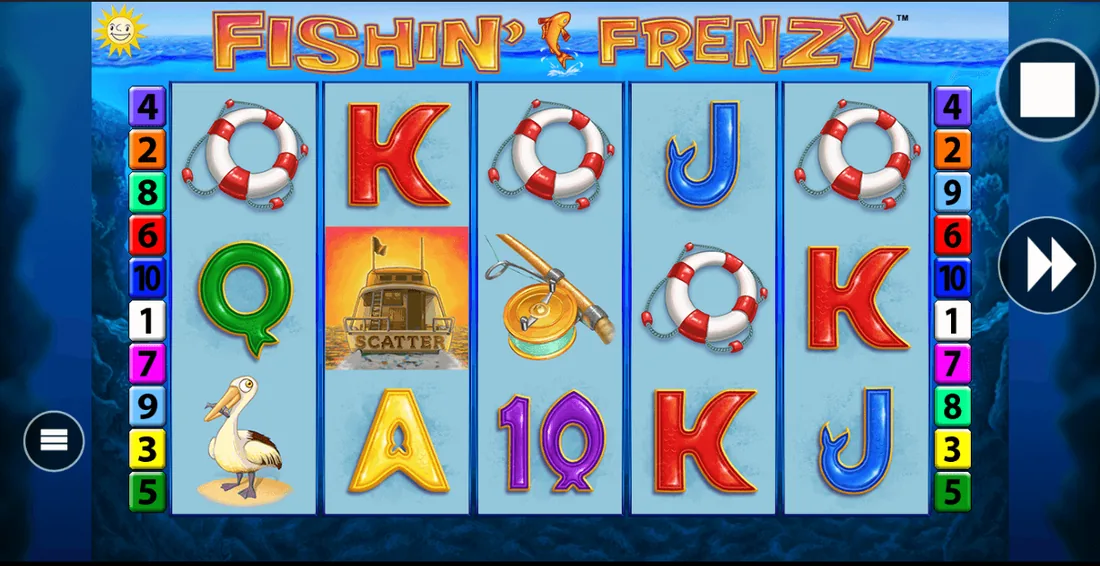
Whether you're in a browser tab or an operator app, the Fishin' Frenzy interface unfolds the same way:
- Loading screen: Blueprint logo, a quick animation of the fisherman casting, then the 5×3 grid fades in. Typical load is 2–4 seconds on 4G; slower if you're on patchy pub WiFi.
- Main game view: Bright blue water backdrop, cartoon fish bobbing on the reels, the red-and-yellow fisherman symbol front and centre. Stake selector at the bottom (tap the chip stack to cycle £0.10, £0.20, £0.50, £1.00, up to your account's cap — £5.00 for most, £2.00 if you're 18–24). Autoplay toggle, turbo-spin icon, paytable button (the «i» circle) on the right edge. Balance and bet displayed in £ with two decimals.
- Free Spins trigger: Land three or more scatter symbols (the «Free Spins» text on a life ring), the screen flashes, a quick cutaway shows the fisherman hooking a fish, then you're into the bonus. The reels stay the same, but every wild that lands gets collected. After the last spin, wilds reappear in random positions and you get one final spin with them locked. Wins tally in real time at the top.
- Paytable overlay: Tap the info icon, a slide-up panel lists symbol values (five-of-a-kind pays for the premium fish, four or three for the card ranks), the Free Spins rules, and the RTP bracket (usually 96.00% to 96.12%, but check the operator's game info page — some configure it lower). Exit by tapping outside the panel or the X.
- Win celebration: If you hit a decent line — say, 50x bet or more — the reels dim, a coin-splash animation plays, and the win counter rolls up. Mega-wins (200x+) get a longer flourish and a boat-horn sound effect. Then you're back to the base game.
The layout's optimised for portrait and landscape, though most players stick to portrait for one-handed spins. No forced rotation, no intrusive pop-ups mid-game (UKGC operators can't interrupt play with bonus offers once a session starts).
Phone Requirements and What Actually Matters
Fishin' Frenzy runs on HTML5, which means if your phone's browser can handle modern web standards, you're in. Here's the practical baseline:
- Operating system: iOS 13 or later (that's iPhone 6s onwards), Android 7.0 Nougat or later (anything from late 2016). Older devices might load the game but struggle with animation smoothness.
- RAM: 2 GB minimum for stable play. With 1 GB, expect stutters during Free Spins or if you've got other tabs open.
- Storage: Browser version uses zero local space — it streams. Operator apps need 80–120 MB free, plus breathing room for cache (another 20–30 MB over time).
- Connection: 3G works, but barely. Spins lag, the balance updates late, and you risk a disconnect-and-resume if signal drops mid-round. 4G is the comfortable floor; 5G or WiFi gives instant response. Data use: roughly 1–2 MB per ten minutes of play, heavier if graphics quality auto-scales up.
- Screen: Readable on a 4.7-inch display (iPhone SE size), but the paytable text gets cramped. 5.5 inches or more is the sweet spot.
One thing that trips people up: if you're playing real money, the operator's age-verification and KYC checks happen before your first deposit. That means camera access (to scan your driving licence or passport) and sometimes location services (to confirm you're in the UK when you open the app). Those permissions are legitimate for UKGC compliance; a game asking for them outside the onboarding flow is suspect.
Version Notes (Or Why the Game Just… Changes)
Blueprint doesn't push version updates like a traditional app. The game's server-side: when you load Fishin' Frenzy, you're pulling the current build from Blueprint's RGS (remote game server). If they tweak the paytable layout or patch a rendering bug, it goes live for everyone instantly. No App Store approval lag, no «update required» nag screens.
Recent changes players have noticed (based on operator forums and support chats):
- Balance display now rounds to two decimals consistently (used to show three on some operators, confusing when you're near the stake cap).
- Autoplay now pauses if you trigger Free Spins — a UKGC safer-gambling nudge so you're aware the bonus is active. You manually resume after the feature ends.
- The «responsible gaming» footer link is more prominent (bold text, always visible in-game). Taps through to BeGambleAware and your operator's deposit-limit tools.
- Session reminders: if you've been spinning for 60 minutes straight, a pop-up suggests a break and shows your net position. You can dismiss it, but it'll reappear every hour.
- The Free Spins retrigger logic hasn't changed, but the animation's smoother on high-refresh-rate Android screens (120 Hz).
None of these alter the RTP or hit frequency — those are certified and locked. What you will see vary between operators: some configure the game to a lower RTP (95.00% exists), others cap max bet differently, or disable turbo-spin. Check the paytable's RTP line before you commit real stakes.
Spotting a Clone and the Permissions That Scream Danger
Fake Fishin' Frenzy builds circulate because the original's popular and the name's easy to mimic. Here's how to separate real from rogue:
- Check the operator's UKGC licence: every site serving UK players must hold a remote gambling licence. The number's in the footer (format: 000-000000-R-000000-XXX). Look it up in the UKGC's public register and verify the company name matches. If the footer's missing a licence or the number doesn't resolve, you're on an unlicensed site — which is illegal to market in the UK and won't be on GAMSTOP.
- Blueprint branding: the loading screen should show «Blueprint Gaming» or the operator's licensed partnership. Clones often use generic developer names («Fun Slots Ltd», «Mega Casino Games») or skip the splash entirely.
- Paytable and RTP: the real game lists its RTP as 96.00% to 96.12% (or lower if the operator's configured it down, but never above). A clone might claim 98% or omit the figure. The symbol values should match Blueprint's certified maths — if five premium fish pay 500x in the official game but 750x in the version you're testing, it's not the original.
- Payment methods: UKGC operators accept debit cards, PayPal, Apple Pay, and Open Banking. Credit cards have been banned for gambling since 2020. If a site's asking for a credit card or offering crypto deposits, it's not UKGC-licensed.
- GAMSTOP integration: real operators link to GAMSTOP and honour self-exclusion. Clones ignore it because they're not in the UK regulatory framework.
Now, permissions. When you install an operator's native app or add to home screen, expect these:
- Camera: for scanning ID documents during KYC (driving licence, passport). Requested once, during account verification. If the app asks for camera access mid-spin or before you've deposited, reject it.
- Location: to confirm you're in the UK when you open the app or make a bet (geofencing for UKGC compliance). Should trigger at login, not continuously in the background.
- Notifications: optional, for bonus alerts or responsible-gaming reminders. You can deny this without breaking functionality.
- Storage: to cache game assets and save login tokens. Normal for any app.
Red flags that signal a fake or malicious build:
- Contacts access: no legitimate slot game or casino app needs your address book. This is data-harvesting or prepping for SMS phishing.
- Phone / SMS: if it's asking to read your messages or make calls, it's hooking into two-factor codes or billing. Deny and uninstall.
- Microphone: zero use case for a slot. Clones sometimes bundle ad SDKs that listen for keywords. Hard pass.
- Install unknown apps: Android's warning when you sideload. If you're doing this for a casino app, ask why the operator isn't in the Play Store (most UKGC-licensed ones are).
FAQ
Why isn't there a standalone Fishin' Frenzy app in the Google Play Store or App Store?
Blueprint Gaming licenses the game to casino operators rather than publishing it directly. You access Fishin' Frenzy through an operator's app (like Betfair, Sky Vegas, or Grosvenor) or their mobile website. The game itself is HTML5 and runs in-browser or within the operator's platform, so there's no Blueprint-branded installer. If you see a «Fishin' Frenzy» app under a generic developer name, it's likely a clone — check the UKGC register before downloading.
Is it safe to download an APK from a third-party site to play Fishin' Frenzy?
No. APKs from unofficial sources bypass Google Play's vetting and often contain modified code — anything from ad injectors to phishing overlays. UKGC-licensed operators distribute their apps through official stores or their own verified websites, and they don't require sideloading. If a site's pushing an APK, verify the operator's UKGC licence number in the public register and check that the file signature matches the official release. Safer to use the browser version or download the operator's app from the Play Store directly.
Do I need to install anything to play Fishin' Frenzy on my phone, or can I just use the browser?
Browser play works fine — no install needed. Open the operator's mobile site, log in (or play demo if you're age-verified), and tap the game tile. It loads in HTML5 and uses minimal data (1–2 MB per ten minutes). If you want a home-screen icon for quicker access, use «Add to Home Screen» in Safari (iOS) or Chrome (Android) — it creates a shortcut that opens the game in full-screen browser mode, still zero local storage. Operator apps (80–120 MB) are optional and mainly useful if you prefer a native interface or want offline access to account settings.
How do I know if the Fishin' Frenzy version I'm playing is the real Blueprint game and not a fake?
Check four things: the operator's UKGC licence number in the footer (verify it in the UKGC public register), the Blueprint Gaming branding on the loading screen, the RTP in the paytable (should be 96.00%–96.12% or the operator's configured variant, never above), and the payment methods (debit cards, PayPal, Apple Pay — no credit cards, which have been banned for UK gambling since 2020). Clones often skip the licence, claim inflated RTPs, or ask for dodgy permissions like contacts or SMS access. When in doubt, play the browser version on a known UKGC-licensed site rather than sideloading an APK.